Environment variables
How Joppa keeps the .env up to date with HTTPS domains and linked services, without ever writing before showing you the diff.
The Environment tab (E) manages the project’s .env. Joppa writes two things there: the HTTPS addresses of your domains and the connections to linked services. Everything goes through a diff that you confirm.
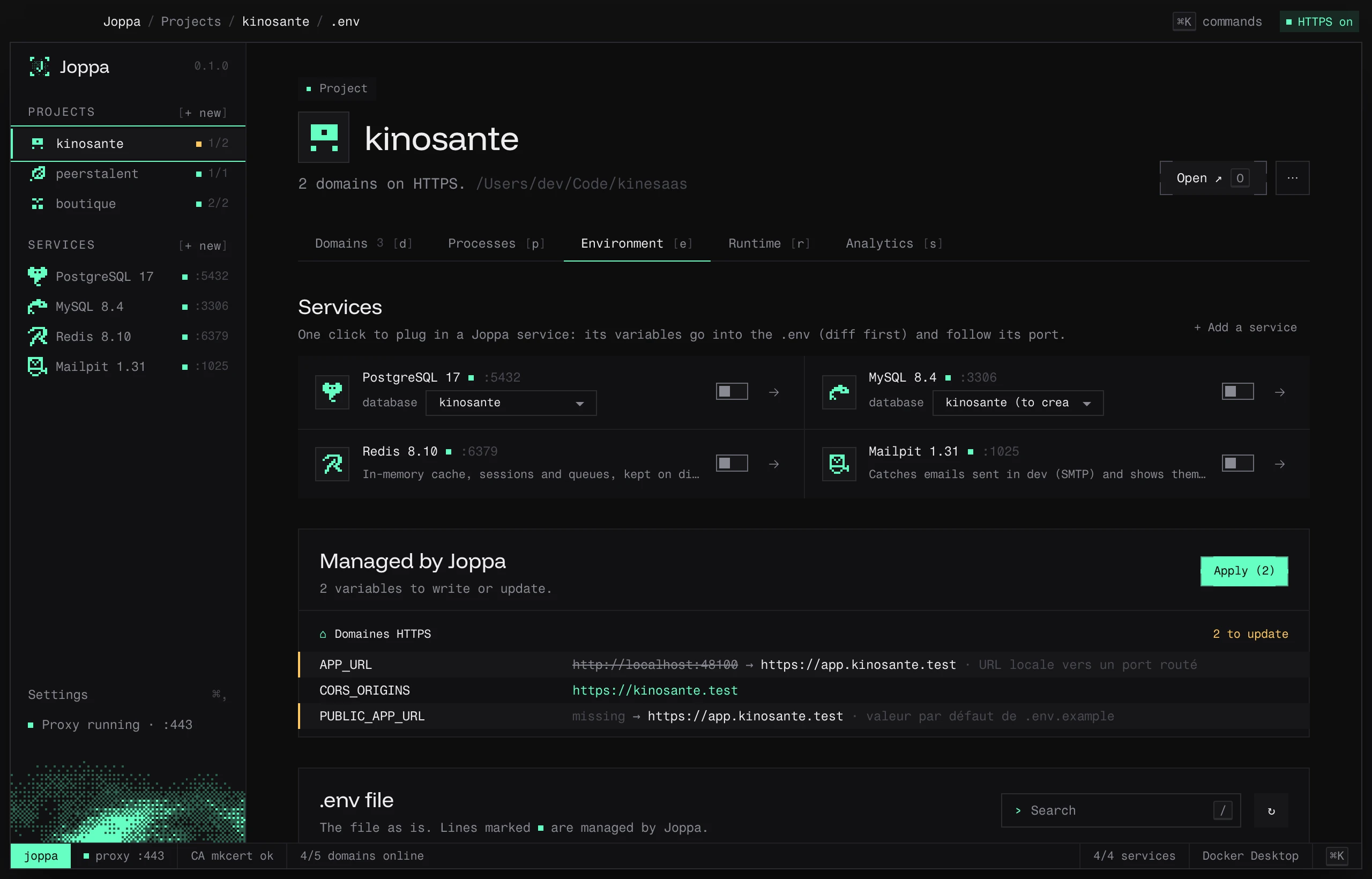
Plug in a service
The services block lists Joppa’s services. Use PostgreSQL (or Redis, Mailpit…) opens a diff with two choices:
- Link and write to .env: the service’s variables are written, and kept up to date if its port changes.
- Link without writing: Joppa remembers the link, without touching the file.
For a database, if the project’s database doesn’t exist yet, Joppa creates it. A project uses only one service of each kind: plugging in MySQL replaces PostgreSQL.
Stop using… does the reverse: Unlink and clean up .env restores the value from .env.example (or removes the variable), Unlink without touching .env leaves the file as is. Variables you edited by hand are kept.
Which variable names
Joppa writes under the names the project already reads: those in .env, then those in .env.example (even commented out). It recognizes many aliases (DATABASE_URL, DIRECT_URL, POSTGRES_PRISMA_URL, POSTGRES_*, PG*, MYSQL_*…) and keeps the scheme and parameters of your existing URLs.
If the project declares nothing, Joppa uses its framework’s usual names:
| Service | Laravel | Others |
|---|---|---|
| Database | DB_CONNECTION, DB_HOST, DB_PORT, DB_DATABASE, DB_USERNAME, DB_PASSWORD |
DATABASE_URL (Symfony: with ?serverVersion=…&charset=utf8) |
| Redis, Valkey | REDIS_HOST, REDIS_PASSWORD, REDIS_PORT |
REDIS_URL |
| Mailpit | MAIL_MAILER=smtp, MAIL_HOST, MAIL_PORT… |
Symfony MAILER_DSN · Rails SMTP_ADDRESS, SMTP_PORT · Django EMAIL_HOST, EMAIL_PORT · Node SMTP_HOST, SMTP_PORT |
| Meilisearch | MEILISEARCH_HOST, MEILISEARCH_KEY, SCOUT_DRIVER |
Symfony MEILISEARCH_URL, MEILISEARCH_API_KEY |
| Typesense | TYPESENSE_*, SCOUT_DRIVER |
TYPESENSE_HOST, TYPESENSE_PORT, TYPESENSE_PROTOCOL, TYPESENSE_API_KEY |
The framework is recognized by its files: Laravel (artisan), Symfony, Django (manage.py), Rails, Node (package.json).
HTTPS addresses
Any http://localhost:PORT value (or 127.0.0.1, [::1]) whose port has a domain becomes the matching HTTPS address, including inside a comma-separated list:
- APP_URL=http://localhost:8000
+ APP_URL=https://myproject.test
- CORS_ORIGINS=http://localhost:5173,http://localhost:3000
+ CORS_ORIGINS=https://app.myproject.test,http://localhost:3000
Default values from .env.example that are missing from .env are handled the same way.
Managed by Joppa
The Managed by Joppa block groups the variables Joppa wants to write: to update and up to date. Apply (N) opens the diff and writes the file.
The .env editor
You edit the file directly in Joppa. Lines managed by Joppa are marked.
- / or ⌘ F: search in the file.
- In .env.example, missing here: the list of missing keys, and + Add missing keys (added under
# From .env.example (Joppa)). - ⌘ S: Review and save, with the diff.
- If the file changes on disk while you’re editing it, Joppa tells you.
Without a .env, Joppa creates one on save.
What Joppa guarantees
- Always a diff before writing.
- A backup: on the first write, the original file is copied to
.env.joppa-backup. - Surgical edits: only the relevant lines change; comments,
export, end-of-line notes and multi-line values stay as they are. New keys are added at the end, under a comment (# PostgreSQL (Joppa)).